Introduction
Frontline maritime surveillance runs on trust: trust in the picture, trust in the workflow, and trust in the handoff across crews, platforms, and agencies. This playbook distills how teams make that trust real under load, based on input from frontline operators and mission leaders, plus the engineers and product teams who build and integrate the mission systems those crews rely on.
This was built with expertise from across the PAL Aerospace ecosystem, including CarteNav product leaders, systems integration specialists, and operators flying missions ranging from the Caribbean to Europe’s busiest waterways and everywhere in between. With 600+ ISR software installations across 40+ countries and insights from 400,000+ flight hours behind it, this playbook has a simple aim: to hold up in real operations.
What you’ll get from this playbook
- A clear, platform-neutral model for building and sharing a trusted recognized maritime picture across air, shore, and sea.
- Numbered best practices, each with a practical “How to do it.”
- Practical checks you can apply during planning, live ops, and post-mission review.
- Insights from the field: short vignettes and pull quotes drawn from real operations and real integration work.
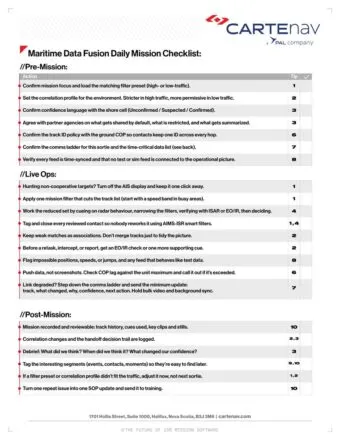
- A printable checklist, included with the PDF download, that maps to the tips so you can run it like a pre-flight and post-flight standard.
Free download
Take the playbook and the checklist with you
Get the designed PDF plus the printable checklist that turns these 11 tips into a routine for every sortie.
- The full playbook as a designed, print-ready PDF
- Daily Mission Checklist: 22 checks for pre-mission, live ops and post-mission, each mapped to its tip
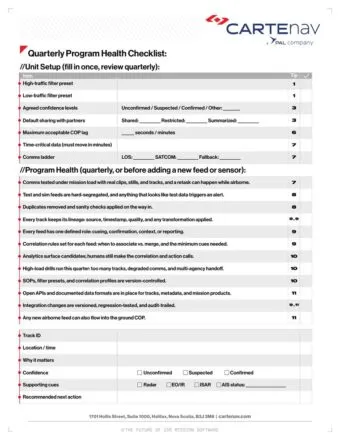
- Quarterly Program Health Checklist, with a fill-in handoff package card
Why maritime fusion is harder now, and what “good” looks like
Maritime surveillance used to be hard because the ocean is big and targets are small. Now it is hard because the signal hides inside a flood of legitimate traffic, across many feeds, across many teams. In the North Sea alone, illicit actors can hide among 250,000+ annual transits and ~15,000 daily radar contacts.
At the same time, the work has become more integrated. You can have six ministries relying on the same picture, in the same room, treating one system as the single source of truth. That is the real standard. A picture that holds up when you brief it, share it, and act on it.
Why it’s harder now
- Volume and clutter – criminal activity hides inside normal life.
- Targets go “dark” – AIS is missing, false, or delayed, so you must hunt with radar and EO/IR under time pressure.
- Multi-agency seams – different mandates, different rules, one operational reality.
- More feeds, more places to lose the thread – open sources can help, but they often sit outside the core mission system.
- Language gets slippery – “fusion” can mean anything from simple association to high-confidence cross-sensor ID. Your team needs shared definitions or you will talk past each other.
The goal: a trusted recognized maritime picture
A trusted picture has three traits:
It spots anomalies in clutter, fast.
It makes uncertainty visible instead of pretending it is solved.
It supports clean handoff between crews and shore teams, so everyone works from the same map.
Glossary
| Term | What it means in the playbook | Why it matters |
|---|---|---|
| Maritime data fusion | Combining multiple sources to build a more useful maritime picture than any single feed. | Fusion only counts if it improves decisions and trust. |
| Association vs correlation | Association is a tentative link. Correlation is a higher-confidence match based on rules/probability. | Prevents false merges and false certainty. |
| Track (+ track management) | A track is a system’s object over time. Track management is how tracks get created, updated, split, merged, and retired. | This is where pictures become trusted or untrusted. |
| Recognized Maritime Picture (RMP) | The best current view for a defined area and mission, including what is known, unknown, and suspected. | The output people brief, share, and act on. |
| COP vs LOP | COP is the shared picture across teams/agencies. LOP is the local picture on a platform/crew. | Cuts seams. Keeps crews effective when comms degrade. |
| Maritime Domain Awareness (MDA) | Understanding what is happening at sea, why it matters, and what to do next. | MDA is the outcome. RMP is a key deliverable. |
| CONOPS | Mission intent and operating concept: who needs what, when, and for what decision. | Defines relevance. Stops you from fusing the wrong problem. |
| AIS and “dark” targets | AIS is a cooperative broadcast. “Dark” means missing/misleading AIS. | Drives reliance on radar/EO/IR and careful correlation. |
| Core sensors (radar, EO/IR, SAR/ISAR) | Radar detects and tracks. EO/IR confirms. SAR/ISAR adds wide-area and classification cues. | Provides detection + ID under real conditions. |
| Clutter and anomalies | Clutter is normal traffic/noise. Anomalies are what breaks the pattern for the mission. | The job is often anomaly finding, not tracking everything. |
| Latency and comms (LOS, SATCOM) | Latency is delay. LOS is high quality but limited range. SATCOM is broad but bandwidth-limited. | Late truth can be useless. Prioritization rules matter. |
| Handoff and mission recording | Handoff is passing context/tracks/intent between crews and shore. Recording captures tracks/sensor views for review and evidence. | Enables reliable operations, learning, and defensible outcomes. |
The next 11 tips are the operating playbook for getting there. They are platform-neutral by design. The point is not the airframe or the sensor brand. The point is a picture your crew trusts and your partners can act on.
1. Strip out normal traffic first so the anomalies stand out
Most missions do not fail because crews lack data. They fail because the screen fills with normal traffic and the abnormal gets buried. This tip is about one thing: reducing the picture fast so you spend your time on the few tracks that might matter.
In practice, that means you temporarily remove “known” or “cooperative” contacts (like AIS broadcasts) and use simple filters to shrink the radar picture to a workable set. Then you work what remains: confirm, tag, and move on.
From the Field
In a busy area, radar produced roughly 196 tracks. The crew applied a speed-based filter aligned to the mission, which collapsed the picture to about 30. With the clutter reduced, they could focus on a small number of contacts, cross-cue EO/IR where needed, and move through the set without getting stuck.

Scott Richardson
VP of Product, CarteNav
How to do it (using mission software such as AIMS-ISR)
- Turn off AIS display when the mission focus is non-cooperative behaviour. Keep it available, but don’t let it dominate the view.
- Apply one mission filter that cuts the track list hard (speed band is a good first move in busy areas).
- Cross-cue EO/IR on the reduced set to confirm or clear contacts.
- Tag and close out reviewed contacts so you do not rework the same tracks under pressure.
- Save it as a preset (high-traffic / low-traffic) so crews can do this in seconds.
2. Show uncertainty clearly to avoid false certainty
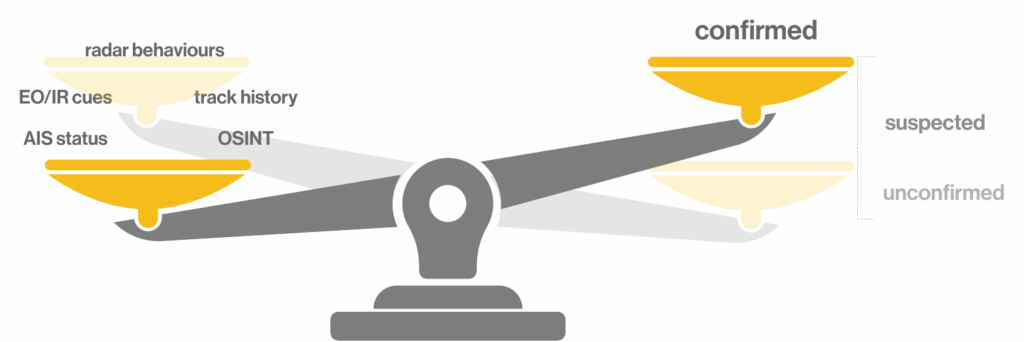
Clutter is bad, but false certainty is worse. A clean screen can still lie if the system quietly merges weak matches or presents low-confidence cues as fact. This tip is about keeping the picture honest: show confidence, show why, and keep weak links loose until you confirm.
In practice, that means you treat correlation as “association until proven,” and you make uncertainty visible so operators do not act on a neat story that is wrong.
From the Field
In one retask, the crew had limited details and no cooperative ID to lean on (“not on AIS”), so they treated the track as unconfirmed and built confidence in steps: predict likely position from last known data, narrow candidates in radar, then cross-cue EO/IR and check track history before escalating. The operator did not present it as a clean, fused “fact.” He stated confidence as a decision-grade estimate: “Within 10 minutes… we were confident, 90% confident that that was our guy.”
Force Multiplier Program Operator
UK
How to do it (using mission software such as AIMS-ISR)
- Do not force merges to “tidy the picture.” Keep tentative matches as associations until you have enough cues to justify correlation.
- Make confidence visible at the track level. Use a simple confidence indicator and a “why” view (what cues drove the link).
- Set different correlation profiles by environment. High-traffic rules should be stricter to avoid bad merges; low-traffic rules can be more permissive.
- Require a confirmation step for high-impact decisions. If a correlation drives retask, intercept, or reporting, demand an EO/IR check or an additional cue where possible.
- Log correlation changes. Keep a simple record of when a track was associated, correlated, split, or de-correlated so the mission story holds up later.
3. Make the handoff package mandatory
Most missions do not break down in the sensor stack. They break down in the seam between the crew and the shore cell. A track moves, but the “why” gets lost, so the shore team has to rebuild context under time pressure.
The fix is simple and strict: every escalated contact leaves the platform with a short, repeatable handoff package that carries what it is, why it matters, how sure you are, and what you want next.
From the Field
When handoffs work, it’s because teams stop treating the COP as a passive display and start treating it as the shared reference for decisions. In the Netherlands Coast Guard coordination centre, multiple stakeholders sit together and work from one picture instead of reconciling several. The mission commander’s description is blunt and operational, not aspirational: they were “using AIMS-C4… as the single source of truth.”
Mission Commander
Netherlands Coast Guard
That “single source of truth” only holds if the story travels with the track. Without a standard handoff package, the COP becomes a map full of symbols that different teams interpret differently. With it, the COP becomes a decision tool. Everyone sees the same track, reads the same rationale, understands the same confidence, and can act without re-litigating intent.
How to do it (using SOP + COP software)
- Define a standard handoff package: Track ID, location/time, why it matters, confidence level, supporting cues (radar/EO/IR/AIS status), and the recommended next action.
- Make “confidence language” consistent across teams: use a simple shared set (example: Unconfirmed, Suspected, Confirmed) so nobody misreads urgency.
- Bake handoff into the workflow: “No handoff package, no escalation.” That one rule removes most seam failures.
- Make it survivable across agencies: decide what gets shared by default, what is restricted, and what gets summarized. Do this before the mission, not during it.
- Record the handoff decision trail so post-mission review can answer “what did we think, when did we think it, and what changed our confidence?”
The checklist that comes with the PDF includes a fill-in handoff package card with these fields, ready to print and use on the next sortie. Get the checklist
4. Confirm fast, not perfectly, for decision-grade confidence
Treat confirmation as a ladder, not a thesis. Get to decision-grade confidence fast (cue → narrow → verify), then act or retask while the window is still open. The goal is speed with discipline, not perfect certainty.
In practice, that means you use radar to cue, you use a small set of filters to narrow, and you use one strong confirming step (often ISAR or EO/IR) to move from “possible” to “actionable.”
From the Field
On a frontline counter-narcotics operation, Dutch Caribbean Coast Guard sensor operator Theo Wilms described the workflow in plain terms: the system shows “radar plots” (the round symbols on the display), and each plot becomes a cue that drives an immediate verification step rather than a long investigative loop. “AIMS-ISR is giving us radar plots right away… Each of those round symbols is a trigger… go to that contact and ISAR it.” The practical outcome is a higher confirmation rate at operational speed — shifting from finding “two or three” low-profile contacts per month to “three or four” every week, because the workflow forces quick confirmation while the window is still open. (“We seized 37,000 kilos of drugs last year.”)
Theo Wilms
Sensor Operator, Dutch Caribbean Coast Guard
How to do it
Cue
Radar anomaly
Use radar anomalies and behaviours as your trigger (profile, motion, loitering, course changes), not gut feel.
Narrow
Filters
Apply one or two filters that match the mission so the candidate set becomes workable (speed band, area box, CPA, time window).
Verify
ISAR + EO/IR
Use the fastest confirming tool available for the scenario (often ISAR first, then EO/IR when needed).
Decide
Retask / intercept / clear
Escalate, retask, or clear the contact. Don’t linger once you have enough confidence for the decision you need to make.
Repeat
Tag / close
Tag/close reviewed contacts so you keep momentum and avoid rework.
5. Produce one trusted “Information Product”
Frontline crews don’t win by collecting data. They win by delivering a clean, timely information product that leaders can act on fast. That means accuracy, formatting discipline, and speed to report, not pretty screens.
In practice, it means you treat every mission output like a deliverable: consistent structure, explicit confidence, and a clear “so what / now what” that survives handoff.
From the Field
“Clients rarely care about airframe details or even the type of sensor on board. They care about the information product we produce,” and you get “judged by the quality of the data that comes off your platform.” In other words, the mission system only matters insofar as it consistently produces a clean, credible output that decision-makers can use immediately.
Will Taylor
System Integration Specialist (SE&I), PAL Aerospace
How to do it
- Standardize the format. Same sections every time: what happened, what changed, confidence, supporting cues, recommended next action.
- State confidence explicitly. Don’t bury uncertainty in prose. Put it where decision-makers see it first.
- Lead with the decision. The first line should answer: “What do you want the ops cell to do next?”
- Keep it short, but complete. One page is the goal. If you need annexes, attach them, don’t pollute the main product.
- Time-box production. If it can’t be produced while it still matters, it’s an archive, not an operational product.
Information product Example · fictional data
Next action Keep the aircraft on station and task the surface unit to intercept Contact 0417 within 40 minutes.
What happened Unlit vessel, no AIS, held on radar 14 nm north-east of the patrol box at 02:14Z, heading 210° at 18 kn.
What changed Turned 40° toward the coast after the aircraft’s second pass. Speed unchanged.
Confidence Suspected Behaviour and profile match the tasking. No visual ID yet.
Supporting cues Radar track history (52 min), ISAR profile, one EO/IR still. AIS status: none.
One page. Filed 02:41Z, 27 minutes after first detection.
An information product built to the format above. The contact, times and positions are invented.
6. Share the same picture by sharing the data
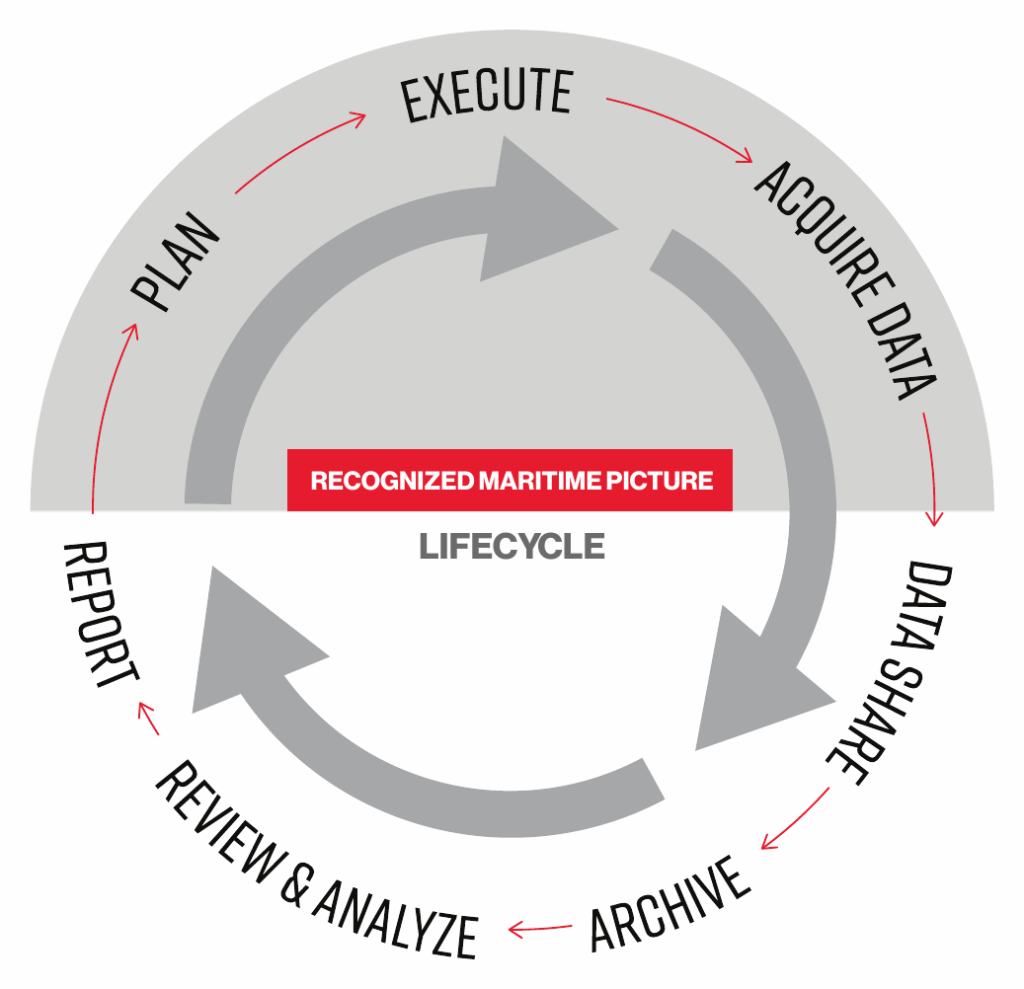
Multi-agency friction drops when everyone works from the same map and the same track story. The practical rule is simple: share the data, not screenshots. Then make it usable on the ground COP so the aircraft and command team do not run two different missions.
From the Field
During a covert retask, the Force Multiplier crew needed the ops centre to work the same track story in real time, not wait for screenshots and summaries after the fact. A Force Multiplier Sensor Operator deployed on that mission described how they handled the handoff: “we are sharing information as it happens… primarily through the new PAL Aerospace LEO SATCOM installation… and then through CarteNav’s AIMS-C4 COP.” In other words, the aircraft did not run a separate mission in the cabin while the coordination cell ran another on the ground. Both teams stayed anchored to the same live data and context. The mission stayed coherent because the COP and the crew were looking at the same evolving picture, at the same time.
How to do it
- Publish data, not pictures. Push tracks, annotations, and sensor-derived outputs as feeds (with metadata), not screen grabs.
- Treat the ground COP as the “record.” The aircraft LOP can be tailored for speed; the COP should preserve the track story for handoff and decisions.
- Use a common track ID policy. If the same contact gets a new ID every hop, you create rework and arguments.
- Send the “why,” not just the “what.” When you correlate, tag, split, or de-correlate, include the cue set that drove it.
- Design for multiple views, one truth. Different teams can filter differently, but they should still pull from the same underlying data stream.
- Time-box synchronization. If the COP lags the aircraft by too long, teams will fall back to side chats and screenshots.
7. Build comms as a resilient stack, not a single link
Treat comms like a core sensor. Assume links will degrade, then design for it: LOS when you can, SATCOM when you must, and bandwidth discipline so high-value data always gets through.
In practice, resilient comms changes the entire operating rhythm. When you can move tasking, detections, clips, and track context in near real time, you stop running a delayed cycle and start running a live one.
From the Hangar
Bruce Conlin, VP of Systems at PAL Aerospace, is explicit that comms is truly what determines whether you operate in a delayed reporting cycle or a live decision cycle. He links real-time connectivity directly to the ability to do PED onboard and keep the aircraft and the ops cell in the same loop: with “real time comms and doing your PED onboard,” he describes moving “from 36 hour cycle into less than 15 minutes where we’re making decisions and retasking the aircraft airborne.” That is the practical test for resilient comms: not “can we send data,” but “can we keep tasking, confirmation, and retasking moving at the speed the situation demands, when every second counts.”

Bruce Conlin
VP of Systems, PAL Aerospace
How to do it
- Define your “time-critical data.” Decide upfront what must move in minutes (tasking changes, track updates, short EO/IR clips, stills, confidence notes) versus what can wait until landing.
- Build a comms ladder. Use the best link available for the mission phase: LOS when you have it, SATCOM when you don’t. Train crews to step up/down the ladder without breaking the flow.
- Set a minimum viable update package. When bandwidth drops, you still push the essentials: track, what changed, why it matters, confidence, next action.
- Control the firehose. Don’t let background sync, bulk video, or “nice-to-have” feeds crowd out the decision loop.
- Prove it under mission load. Test with real artifacts (clips, stills, tracks), not synthetic traffic, and validate that retask decisions can happen while airborne.
The checklist that comes with the PDF has a page to write down your comms ladder (LOS, SATCOM and fallback) and your time-critical data, so every crew flies the same plan. Get the checklist
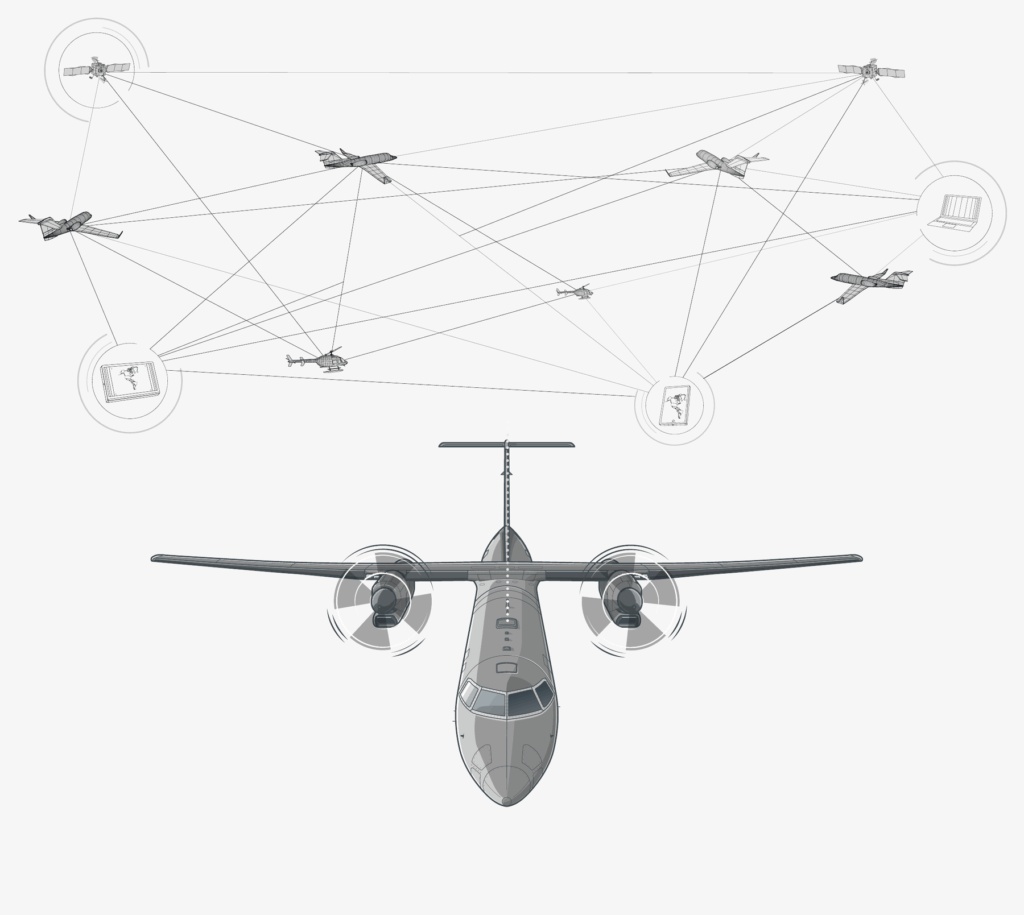
Learn how PAL Aerospace was the first Canadian provider to deliver next-gen LEO SATCOM to contractor-owned, contractor-operated (COCO) airborne ISR operations.
Resilient airborne connectivity that supports a live decision cycle, not a delayed reporting cycle: palaerospace.com/coco-satcom
8. Enforce data hygiene at the edge
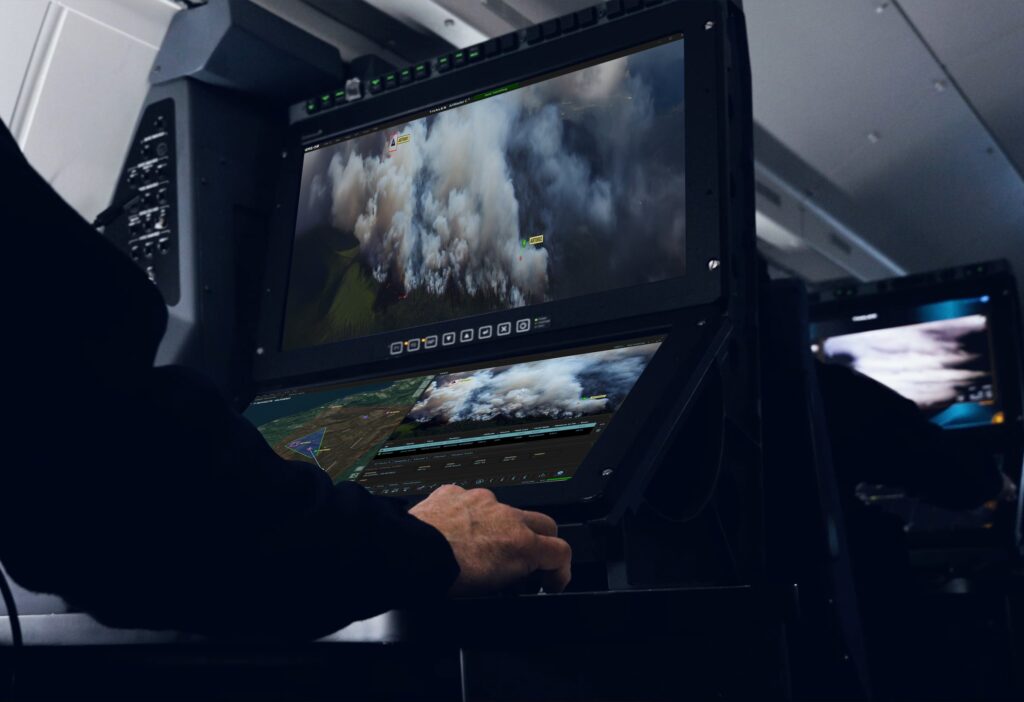
Bad inputs spread faster than good analysis. Clean the data before it pollutes the picture: dedupe, time-sync, sanity-check, and keep test/sim data segregated from operational feeds.
In practice, “data hygiene” is what keeps the recognized maritime picture credible when multiple sensors, networks, and teams touch the same tracks. If you let contaminated or mislabelled inputs into the system, you can end up chasing ghosts — or worse, trusting them.
From the Hangar
Scott Richardson frames data hygiene as a trust problem. During development, integration, and training, teams often generate test or simulated tracks to exercise the mission system. If you don’t strictly separate those non-operational feeds from live inputs, you can contaminate the operating picture and undermine confidence in the whole system. He names the failure mode directly: “from a cybersecurity perspective… [it’s] kind of an example of the risk, right? Simulation data getting pushed into an actual operating picture. So there are a lot of considerations for how data needs to move, be rationalized, be manageable and nicely, be able to be extracted or segregated… required as well.”
Scott Richardson
VP of Product, CarteNav
How to do it
- Segregate environments by default. Test/sim and operational feeds should never share a path without hard controls.
- Time-sync everything. If clocks drift, correlation breaks and the picture lies.
- De-dupe at ingestion. Don’t allow the same contact to enter multiple times under different wrappers.
- Validate basic sanity. Flag impossible positions, speeds, headings, and jumps before they hit the operator’s screen.
- Preserve source lineage. Every track should retain “what fed this” so errors can be traced and corrected.
- Audit and alert. If a feed behaves like test data, the system should scream, not shrug.
9. Plan the on-ramp for new data feeds before you need them
Most organizations bolt on new feeds late and pay for it forever. Decide now how you will ingest, label, correlate, and audit new sources (satellite AIS, SAR, RF, partner feeds, open sources) so they add confidence instead of noise.
In practice, the “on-ramp” is not just technical integration. It’s how you make a new feed usable under pressure: clear labeling, clear lineage, clear confidence, and a clear way to retrieve what matters later.
How to do it
- Define feed roles before integration: cueing, confirmation, context, or reporting. Don’t let a feed drift into “everything.”
- Label and preserve lineage: source, timestamp, quality, and any transformation applied.
- Set correlation rules up front: when to associate vs merge, and what minimum cues are required.
- Build retrieval paths early: tags, event types, and queries that let crews and analysts find “interesting” segments fast after missions.
- Version the integration: document changes, run regression checks, and keep audit trails so trust doesn’t erode over time.
Platform Three AIMS-ISR operator stations
Ground Two AIMS-ISR stations
- ESM
- IMS
- VIDAR
- AIS
- COMINT
- Asset tracking
- Radar
- EO/IR
- Motion tracking
- Searchlight
Platform and ground stations draw on one shared set of sensor and data feeds. Each new feed joins that set, so plan its on-ramp before it arrives.
10. Use analytics to reduce workload, lock it in with SOPs
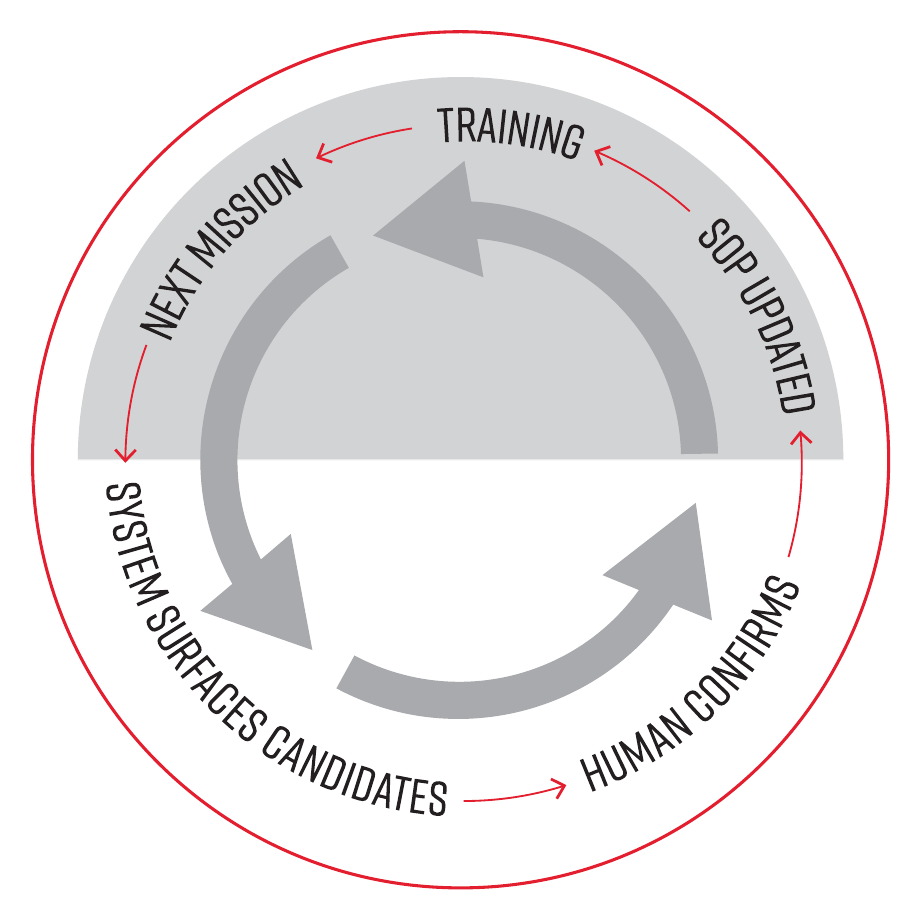
Use automation to triage and surface “look here next.” Keep judgement with the crew. The trap is chasing clever features that no one trusts in the heat of a mission. The win is quieter: reduce workload, speed up review, and make performance repeatable through SOPs, debrief, and training.
In practice, this is less about real-time “magic” and more about post-mission pattern finding and faster retrieval — then turning what you learn into updates crews can execute on the next sortie.
From the Hangar
Jane Fulcher describes what the ops centre needs once you’ve got enough missions behind you to think in weeks, not sorties: “providing just basic dashboards across missions, even if it’s just as stats-based visuals of this week we saw X number of… hostile tracks were identified,” then asking, “what have we seen this week… was there a pattern?” and “drilling into it and giving you a way to not just say, ‘Here’s the last hundred missions,’ but ‘here’s the data that’s actually interesting based on a certain criteria across those hundred missions.’” Her practical end-state is retrieval that lands you on the exact moment: “you would need to look at this one at this time point… then you can see… here was the media that was taken.”

Jane Fulcher
Director of Product, CarteNav
How to do it
- Use triage, not auto-decisions. Let the system surface candidates, anomalies, and patterns; keep correlation and action with humans.
- Record the mission in a reviewable way. Track history, cues used, and key clips/stills so debriefs are evidence-based.
- Run short debrief loops. Turn repeat issues into concrete SOP updates (filters, confirmation ladder, comms packages).
- Train high-load scenarios. Drill “too many tracks,” degraded comms, and multi-agency handoff until the responses are automatic.
- Version your playbook. Treat SOPs and profiles as controlled artifacts that improve over time, not tribal knowledge.
11. Choose open architecture so you can keep upgrading
Threats change faster than procurement cycles. If your mission system locks you into one sensor, one platform, or one data model, you will fall behind while the paperwork moves. Open, standards-based integration, like PAL Aerospace’s, gives you a path to keep upgrading: swap payloads, add partner feeds, and evolve workflows without rebuilding the stack.
From the Field
In the Dutch Caribbean Coast Guard program, the mission system moved from separate inputs and constant mode switching to an integrated view where radar or EO/IR could sit on the same picture with overlays like boundaries, waypoints, and map references. Duane MacLeod, PAL Aerospace’s Director of Training and head sensor operator in Curaçao, summed up what that change buys you in real life: “Before, it was almost up to the TACCO to keep us out of those areas… I can do that on the radar now because I have all those overlays on my radar display. It cuts down the workload for the TACCO, and I get the bigger picture.” He also points to why this matters over time, not just on day one: “With our previous system, everything was locked in place… With AIMS-ISR, the operators can move windows around and customize how their information is laid out. It lets us adapt to different mission profiles.”
Duane MacLeod
Director of Training, PAL Aerospace
How to do it
- Write down the “non-negotiables” first. Require open APIs plus common, documented data formats for tracks, metadata, and mission products.
- Separate sensors from the mission story. Treat each payload as a producer of time-stamped data, not a bespoke UI that traps workflows inside one box.
- Design for plug-in growth. Make “add a new feed” a repeatable process: ingest, label, time-sync, validate, then decide how it correlates and who can see it.
- Demand upgrade paths, not one-off integrations. Lock in interface control documents, versioning, and regression testing so upgrades do not break the mission.
- Keep the ground picture in scope. Ensure whatever you add airborne can also flow into the ground COP when needed, so teams do not run two different truths.
Conclusion
Maritime surveillance keeps getting faster, noisier, and more integrated. The teams that win do not “collect more.” They build trust in the picture and make it portable across crews, platforms, shore cells, and partner agencies.
This playbook reflects what decades of field use and integration have taught us at CarteNav: the trusted picture is a system outcome. It comes from how you manage clutter, confidence, confirmation tempo, comms, handoff discipline, data integrity, and upgrade paths. It does not come from any single sensor or screen.
Thanks to the operators, integrators, and product leaders who shared their experience and language for this guide. From the Caribbean to Europe’s busiest waterways and everywhere in between, we’ve built and supported 600+ ISR software installations in 40+ countries, and these tips capture the repeatable practices that hold up when seconds count.
The checklist
Get the Printable Guide + Checklist
Download the designed PDF and its two-page checklist: what to confirm before the mission, during live ops, and after you land.
- The full playbook as a designed, print-ready PDF
- Daily Mission Checklist: 22 checks for pre-mission, live ops and post-mission, each mapped to its tip
- Quarterly Program Health Checklist, with a fill-in handoff package card